
You can prepare for Modern Warfare 4 now by checking three things: the platform you will play on, the Activision account you will use and, on PC, the required security settings. Do those checks before buying an edition or planning a launch session. A successful Beta install does not establish the final game’s complete requirements.
MW4 launch setup: Platform, account and PC checklist
In this guide
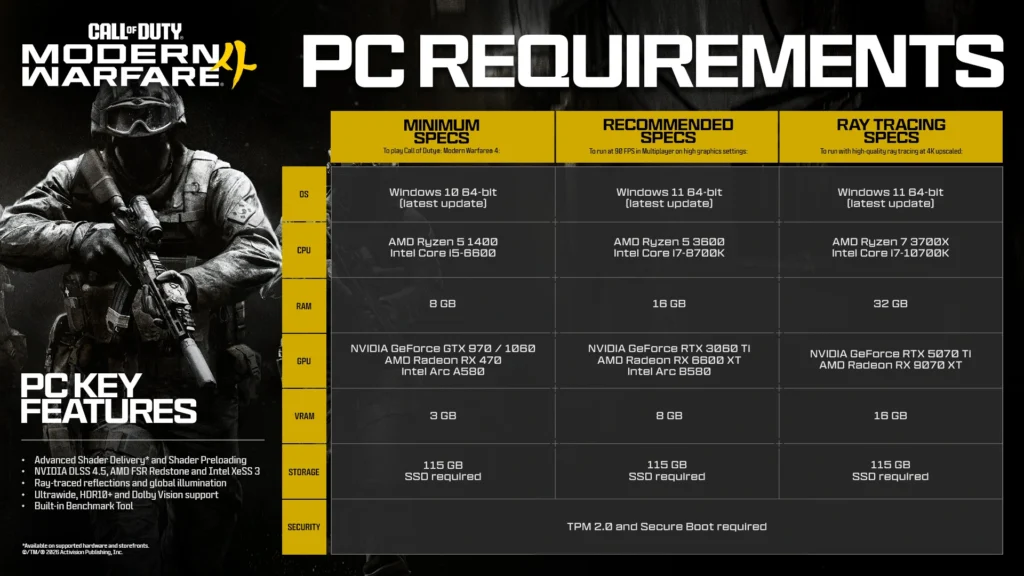
Official PC requirements artwork: Activision / Call of Duty, September 29. It describes the launch hardware tiers, not early-access eligibility. Source. Open full-size requirements image; the article explains the key checks in text.
Launch preparation refreshed October 11, 2026. MW4 releases October 23 on PS5, Xbox Series X|S, Nintendo Switch 2 and PC through Xbox on PC, Steam and Battle.net. Official platforms and editions.
Your launch setup checklist
- Match the edition to your exact platform and store.
- Check your existing Activision account before linking anything.
- On PC, verify TPM 2.0 and Secure Boot.
- Check your first mode: Campaign Early Access October 16; DMZ Early Access October 20 for eligible digital preorders. On PC, compare the current launch specifications before installation.
When can you preload and start playing?
Activision’s October 9 announcement adds a separate DMZ early-access date. Eligible Standard Digital and Vault Edition preorders or prepurchases qualify for Campaign Early Access from October 16 and DMZ Early Access from October 20. The full game launches October 23. The announcement lists Xbox Series X|S, Xbox on PC, PS5, Battle.net, Steam and Nintendo Switch 2. This digital-edition benefit does not establish equivalent access for a physical purchase.
| Milestone | Date | Who or what it applies to |
|---|---|---|
| PC preload | October 15, 9 AM Pacific / noon Eastern | Digital PC prepurchasers |
| Campaign Early Access | October 16 | Eligible Standard Digital / Vault preorders |
| DMZ Early Access | October 20 | Eligible Standard Digital / Vault preorders |
| Full launch | October 23 | Game release |
PC preload source: September 29 official PC announcement. Campaign and DMZ eligibility: October 9 announcement.
Preloading downloads game files; it does not unlock a mode before its start. Only the PC preload time is specified here: do not turn it into an assumed console preload time or a worldwide DMZ opening hour. Actual early-access play time, platform availability and dates can change. Check the October 9 early-access announcement and your exact storefront before arranging a session.
Which platform and edition are you preparing?
Write down the device and storefront, not just “PC” or “Xbox.” Activision confirms Xbox Play Anywhere access across Xbox Series X|S and Xbox on PC when purchased through the corresponding Xbox stores. That specific entitlement should not be read as a promise about a Steam or Battle.net purchase. MW4 editions support.
| Your setup | First check | Record for yourself |
|---|---|---|
| PS5 or Xbox Series X|S | Edition and account used to obtain it | The store and library entry |
| PC | Storefront, hardware and security requirements | Your launcher and exact PC components |
| Nintendo Switch 2 | The matching platform edition | Purchase details and current platform instructions |
| Moving from an older console | Supported destination and linked account | Old and new platform account names |
This takes the ambiguity out of troubleshooting. “I bought it on Steam but I am checking the Xbox app” is a different problem from “the game is in my library but will not start.” Keep your purchase receipt available, then use the help route for the store that handled that purchase.
Is the right Activision account linked?
Check the Account Linking section of your Activision profile before making changes. Activision says cross-progression is stored on the Activision account. Linking a platform to a different Activision account does not move that progress, and individual platform unlinking is generally limited to once every 12 months. Managing your Activision account.
Make this an inspection first. Confirm the platform account names and the Activision identity you recognize from your existing play. If something looks wrong, read the relevant support guidance before unlinking it. Trying several account combinations is a poor way to diagnose missing progress.
Also check that you can receive account email and use your chosen two-factor authentication method. Activision’s two-factor authentication support page covers setup, backup codes and login problems. Store recovery material privately, away from screenshots or documents you share with other players.
What must PC players check?
The September 29 launch announcement specifies a 115 GB SSD installation and requires TPM 2.0 and Secure Boot. Its launch table supersedes the older Beta hardware guidance. Official launch PC requirements. Allow additional space for updates.
The practical order is to identify your hardware, check the official requirements, then investigate any mismatch. Record your processor, graphics card, RAM and Windows version. This gives you a useful support question and avoids shopping for an upgrade before you know what is actually missing.
For security checks, use Activision’s TPM and Secure Boot guidance. It provides a Secure Attestation Wizard and links to the appropriate checks. If a change is needed, follow your hardware manufacturer’s instructions. Activision advises getting manufacturer or professional help when you are unfamiliar with UEFI or BIOS settings because incorrect changes can cause boot problems.
Passing a security check is one part of preparation. It does not benchmark your frame rate, confirm a particular graphics preset or establish that every launch component is installed. Keep those questions separate so you know what still needs attention.
Which Windows status fields should you inspect?
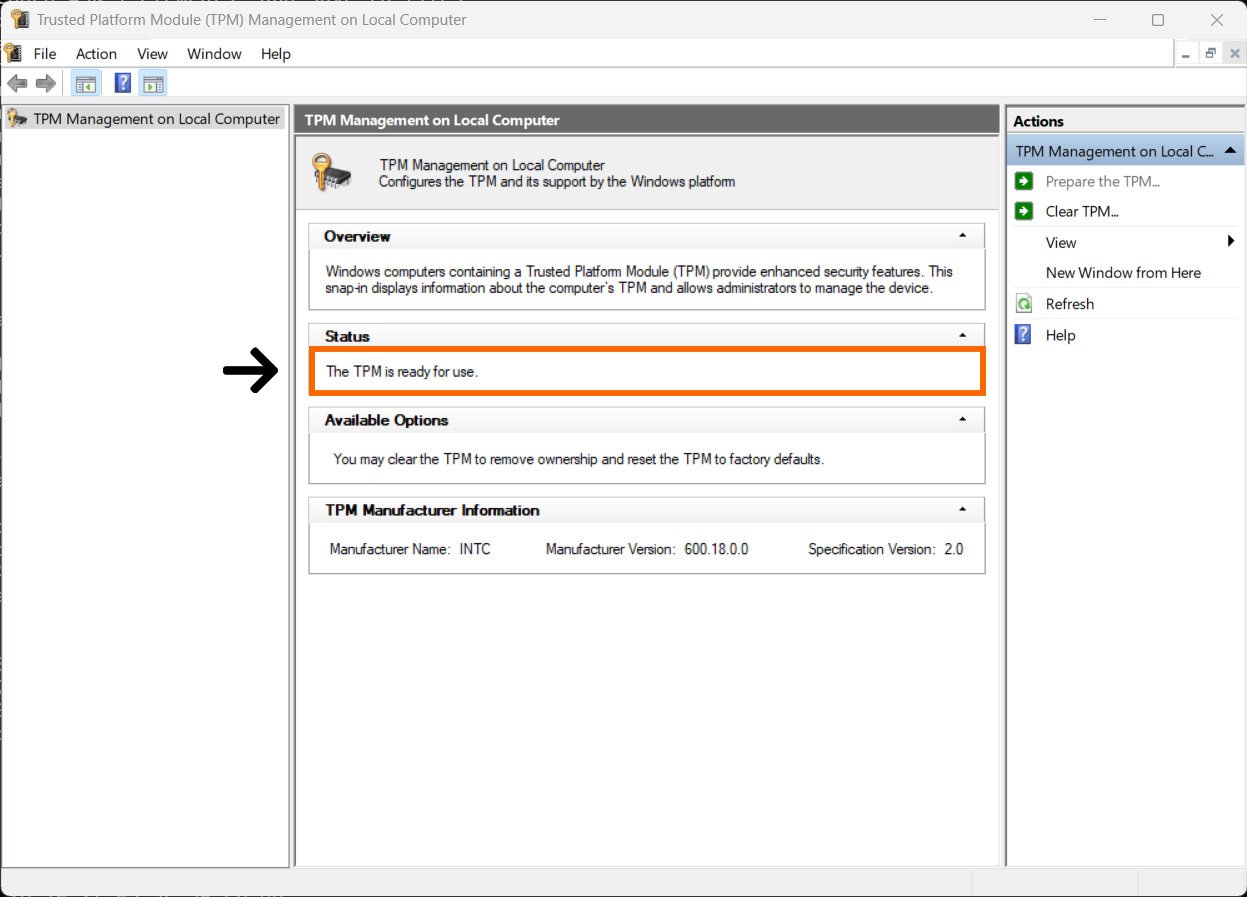
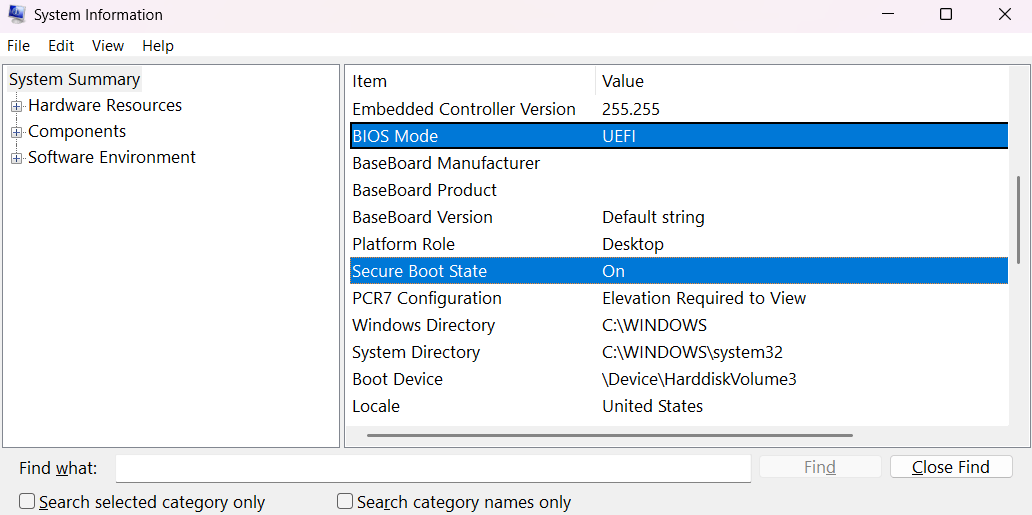
Activision’s read-only checks are Windows key + R, then tpm.msc for TPM status and msinfo32 for System Information. Check that TPM is ready for use and Specification Version is 2.0. In System Information, look for BIOS Mode: UEFI and Secure Boot State: On. The official examples below show those fields; they are not screenshots from your PC.
What changes if you are moving from PS4 or Xbox One?
Warzone’s platform transition has its own timetable. Activision says existing eligible PS4 and Xbox One library owners can play through BO7 Season 06. For the transition to supported hardware, use the same linked Activision account; currency and real-money content have platform-family restrictions. Official Warzone platform update.
Decide whether your next purchase is mainly for MW4, continuing Warzone or both. Then compare your intended platform against the relevant game’s requirements. Do not treat an older Warzone library entry as evidence that the same console will run MW4.
Quick answers before launch
Does downloading the preload let me play immediately?
No. The PC preload date is separate from Campaign and DMZ early access. Match the mode and your qualifying purchase to its announced start date.
Do I need the Vault Edition for DMZ Early Access?
The October 9 announcement includes eligible Standard Digital purchases as well as Vault Edition purchases. Check the exact digital edition and storefront you used.
Does buying a Boss service provide game access?
No. You need your own qualifying game purchase and supported setup. The current MW4 service pages have ordering closed; this checklist does not promise service availability on either early-access date.
What should you save for launch week?
Keep a short note with your chosen platform, account check, PC check if applicable and the first mode you want to play. Add a link to the official support page you used. Revisit the official launch instructions before installation rather than rebuilding your plan from social posts.
Once access is sorted, use the Boss MW4 guide hub to choose a progression goal. The MW4 camo tracker is a manual planning tool; it does not connect to your Activision account. Keep game-account access and your Boss checklist separate.
The Boss MW4 bot-lobby listing has ordering closed when rechecked October 11. These setup steps do not require a Boss purchase, and this article does not promise launch-day service availability.
Information and linked service scope checked October 11, 2026. Dates and pre-release requirements may change.