20 Kill Badge
20 Kill Badge
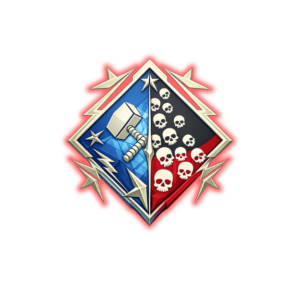
Boss Services Apex Legends 20 Kill Badge — the banner piece that says one match went very, very right. Twenty kills in a single game is a statistical event for most players; for our boosters it's a service. Name the legend, and the badge shows up on it.
What you get
- The 20 Kill Badge earned on the legend you name in the order form.
- Everything earned during the session stays — kills, XP, and any other badges that happen along the way.
- Steam, PSN, and Xbox via Recovery — typically delivered within 1–2 days.
How to order — step by step
- 1 You prepare your account access — Xbox accounts add a BYOM recovery email; Steam and PSN accounts grab their backup codes (walk-throughs in the Requirements section below — about 3 minutes).
- 2 You buy the service on the right and check out (Visa, Mastercard, Apple Pay, Google Pay, Stripe, crypto).
- 3 You send your details through the encrypted order form right after purchase: platform, account email or Steam ID, a temporary password, and your BYOM email or backup codes.
- 4 We sign in and complete the service — verification is covered up front, so you don't need to be online.
- 5 We sign out and notify you. You change your password back, remove the recovery method we used, and confirm delivery on your order page. Done.
What you need before ordering
- Apex Legends on Steam, PSN, or Xbox.
- Your account sign-in — we strongly recommend a temporary password just for the service; change it back the moment we're done.
- Xbox: a BYOM recovery email linked to the account. Steam / PSN: your backup codes. Walk-throughs below.
- You don't need to be online while the service runs.
Xbox — link a BYOM recovery email (about 3 minutes)
- Go to byom.de and type any word — for example yourgamertag123. Your BYOM email is yourgamertag123@byom.de; no sign-up needed.
- Sign in at account.microsoft.com/security → Advanced security options → Add a new way to sign in or verify → Use a different email, and enter the BYOM address.
- Read the confirmation code on byom.de, paste it in, and send us the account email + temp password + BYOM address in the order form. Remove the BYOM email after delivery.
Steam — backup codes (about 2 minutes)
- Steam Settings → Security (or the Steam Guard section of the mobile app) → Get Backup Codes.
- Send one or two codes with your order — generating new codes afterward invalidates the old ones.
PSN — backup codes (about 2 minutes)
- On your PlayStation or at the PlayStation account site: Settings → Account Security → 2-Step Verification → Backup Codes.
- Send one or two codes with your order — you can regenerate the set afterward to invalidate them.
FAQ
Which legend does the badge go on?
Your choice — name the legend in the order form and the badge is earned on that legend's banner.
Do I keep everything earned during the matches?
Yes — XP, kills, and anything else earned along the way stays on your account.
Is my account safe?
Yes. Use a temporary password for the service and change it back the moment we're done, then remove the BYOM email (Xbox) or regenerate your backup codes (Steam/PSN). Credentials are encrypted in transit and deleted from our system when your order closes.
Will I get banned?
We use the safest delivery methods available and we've never had a customer banned for this service. On the very rare occasion something does go wrong, every order is backed by our money-back guarantee.
Which platforms do you cover?
Steam, PSN, and Xbox.
How long does it take?
Most orders start within 24 hours of receiving your sign-in details. Completion depends on the service — your booster posts an ETA in your order ticket before starting.
Do you offer refunds?
Yes — full refund before the service starts, partial mid-flight. See Refund page.